 EchoPad
Conversations
The library of every recording, speaker names, and saving again.
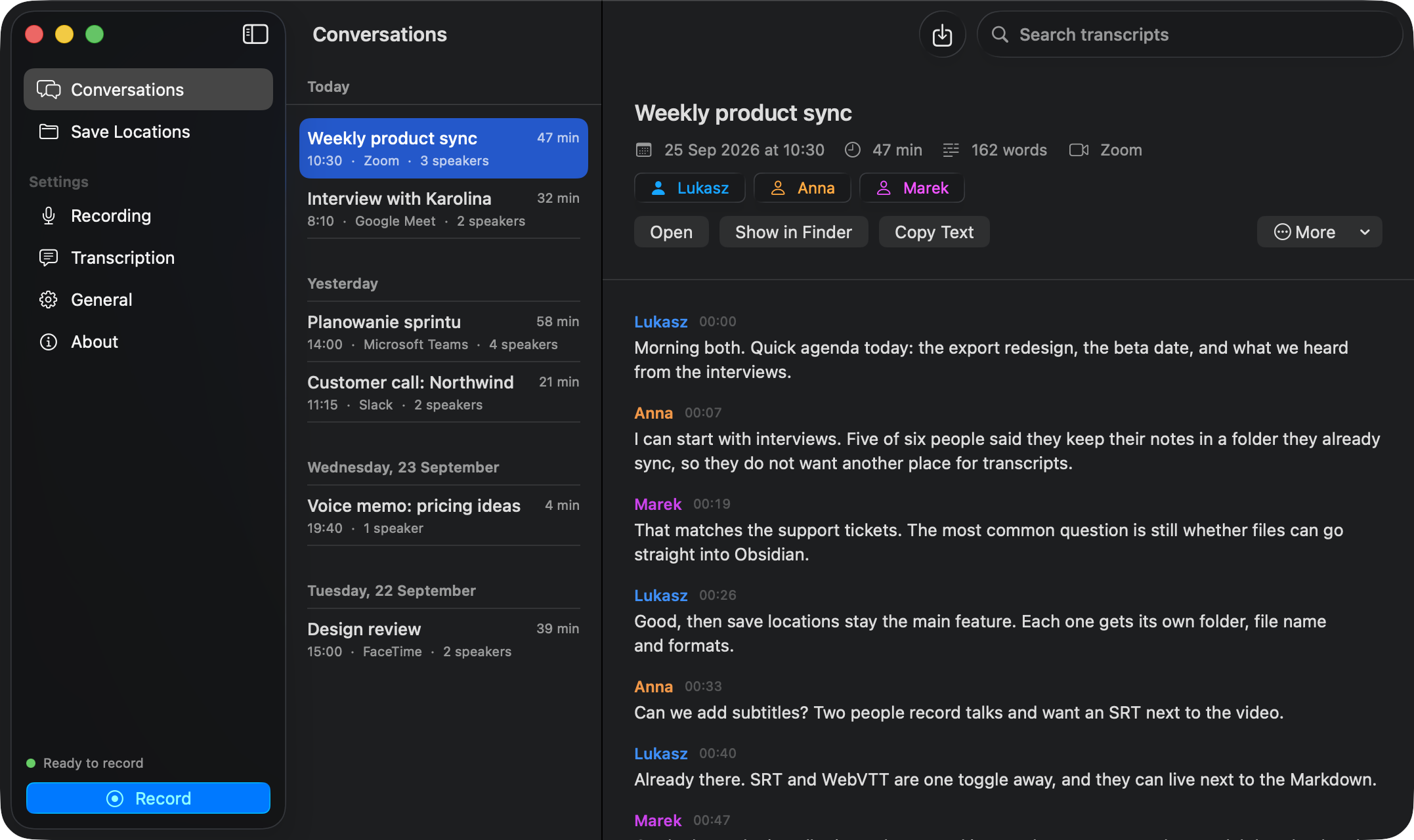
Conversations lists every recording and import, grouped by day, with its length, app and number of speakers. Search looks through titles, speaker names and the full text of transcripts.
A conversation
- Speaker chips under the title. Click one to rename, for example Speaker 1 to Anna. The files in your save location are updated too.
- Open, Show in Finder and Copy Text act on the saved transcript.
- More has:
- Save to, to move the conversation to another save location and write its files there.
- Save Again, to write the files once more.
- Transcribe Again, for example after changing the language or turning on speaker detection.
Right-click a conversation in the list for Show in Finder, Transcribe Again and Remove from EchoPad. Removing deletes it from EchoPad’s library only. Files in your save locations stay.
If something goes wrong
- A recording that fails to transcribe keeps its audio and shows Transcribe Again.
- If EchoPad quits or crashes while recording or transcribing, the tracks are kept and the transcription finishes the next time it opens.